How this web page was created - Part 1 of Many
Hi there.
This is probably my 10th or 11th attempt at maintaining an online journal. Hopefully my last and one where the writing is prolific, useful and engaging. I will make it a point to ensure that there is little or no AI generated content (text) in this page. I use enough AI while writing code and feel I need to keep those cognitive pathways warm in some way. Claude has made me generally very rusty My writing speed has reduced significantly over the past year and I feel that while I can talk faster, I am typing much more slowly. I am not sure why..
Coming back to the main topic of this series of posts. I have had the itch to build my own website for journalling and logging for a very long time. I simply hadn’t gotten down to the task of learning enough of webpage hosting to make a serious attempt. But with the advent of seriously good coding AI (I use claude code and it rocks!), I was finally able to take a stab at it. This is the result. I learnt a lot along the way and would like to document it for two reasons:
Others who want to walk down the same path can avoid many of the pitfalls.
It gives me the illusion of having done something, built a thing, understanding how it works. Without this, there is nothing here that ties the website build to me but a shaky and embarrassing sequence of prompts.
So, there we are. The preliminaries are done and we can dive into the details.
Requirements
My requirements were odd enough that nothing out-of-the box really fit the bill.
Long posts, mostly technical in nature.
Professional type setting - preferably latex style, but with support for “writing on the margins” I really believe that writing on the margins gives a richer feel to a blog / journal entry. It also allows the writer an extra dimension to branch off into without disturbing the flow of the main article
No writing posts in an IDE and pushing code. It is a bit too cumbersome. I need a reasonably formal blogging experience. Should be able to keep posts in a draft state and publish and unpublish them.
Searching for specific posts is important.
Support for equations is important. Images can be uploaded to a bucket and referenced in blog posts.
Simple requirements, but the quirks meant that any thing that was already available as plug and play would fall short on atleast 1 one of the above requirements.
Step 1 : Hugo as a Static Site Generator (SSG)
Primarily a website is just a collection of HTML/CSS/JS files that are used by the browser. We just need some way of making those files available for the browser. There are two ways of making this happen.
The pages can be assembled dynamically where a server runs some code on every single visit. This is very powerful and is exactly how Wordpress operates. There is a database and some PHP The code is executed directly on a server before it is rendered as HTML in the browser code on a server and pages are assembled on the fly.
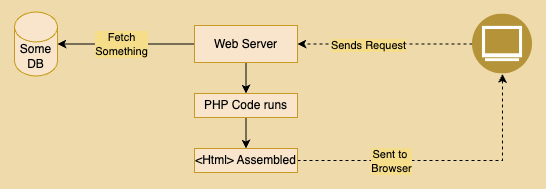
In the case of a static web page, all the pages are generated once and not on the fly and then sent to the browser. The visitor just downloads the final HTML files once and that’s pretty much it. In this particular case, I chose to go the static web page route. It is uncomplicated and serves my purposes well. Not trying to say that this is the right solution to all blogging problems (definitely not), but given my technical appetite, this seemed the most appropriate.
So we need some kind of static site generator, that runs once - generates all the required html files which can then be vended as users visit the web page.
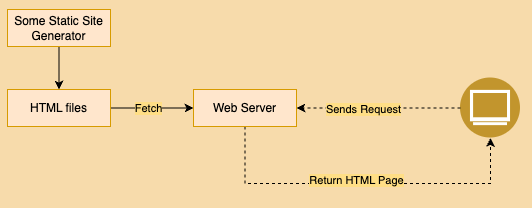
Hugo Quarto is another contender, one that I have used very briefly, but Hugo won because it simple, builds blazingly fast and once it is set up, all I have to do is author markdowns is one such SSG, which generates all pages at once given the content in markdown and some template. It has some advantages which are very pertinent to the present use case. It is a single binary which means that there is no dependency tree to maintain. It is written in GO and is really really fast which means that if I blog prolifically and generate 1000s of posts, the build time of the site will remain quite small and insignificant.
There is a key thing to note here - Hugo does all the work at Build time and not at reader visit-time, we can front load the expensive work (generating the static HTML) and ship the result.
Hugo uses three things to make the generation of static webpages (and more specifically webpages of the kind I like) easier.
(a) A template skeleton which is used to build every page.
(b) Shortcodes which are reusable snippets which are embedded in the markdown files. What these shortcodes are supposed to do can be defined by the user in custom files I prefer to think of them as recipes. Hugo then turns these short codes into appropriate HTML as defined by the user recipe.
(c) Taxonomies such as tags and categories which hugo generates a page for. This comes free with Hugo.
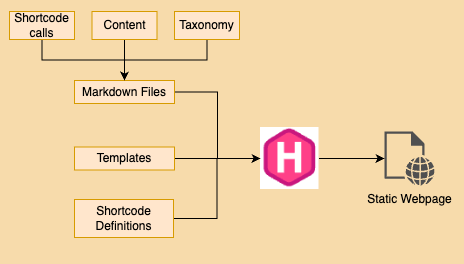
So, the webpage will be static and pre-built using Hugo. This was a decision that claude guided me towards, one that I became more comfortable after about 2-3 iterations. It is not necessary to have a very deep understanding of Hugo. Think of it as a markdown to HTML machine with some very useful and convenient features.